Sets up your sessions.
Bounces them for you.
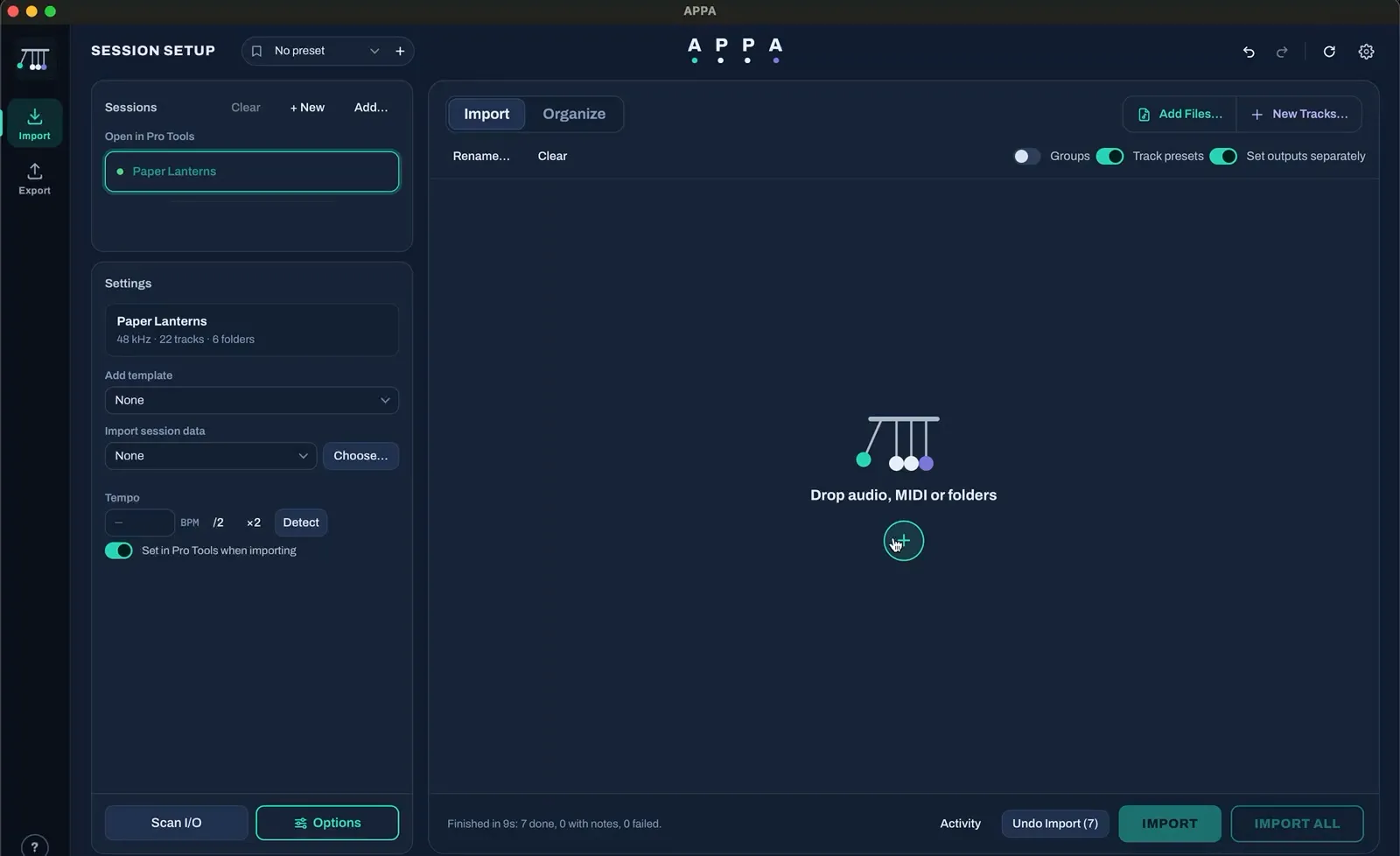
Drop in a folder of files and APPA builds the session: every track in its folder, coloured, routed and grouped. When the mix is done, it bounces every mix, stem and alt version on its own.
Drop the files, get a session built from your template.
See how ↓ ExportList your deliveries; every mix and stem bounces while you're away.
See how ↓7 days free, everything working · macOS · Apple Silicon & Intel · Pro Tools 2025.10+ · Logic Pro 11
Every action in this video is APPA's, not a person's
A real-time video of APPA in Logic Pro is coming soon.
Session Setup builds the session
APPA works out each instrument from the file name, or from what it sounds like, and shows you the plan. Change anything, then press Import: it builds the open session, or a new one from your template.
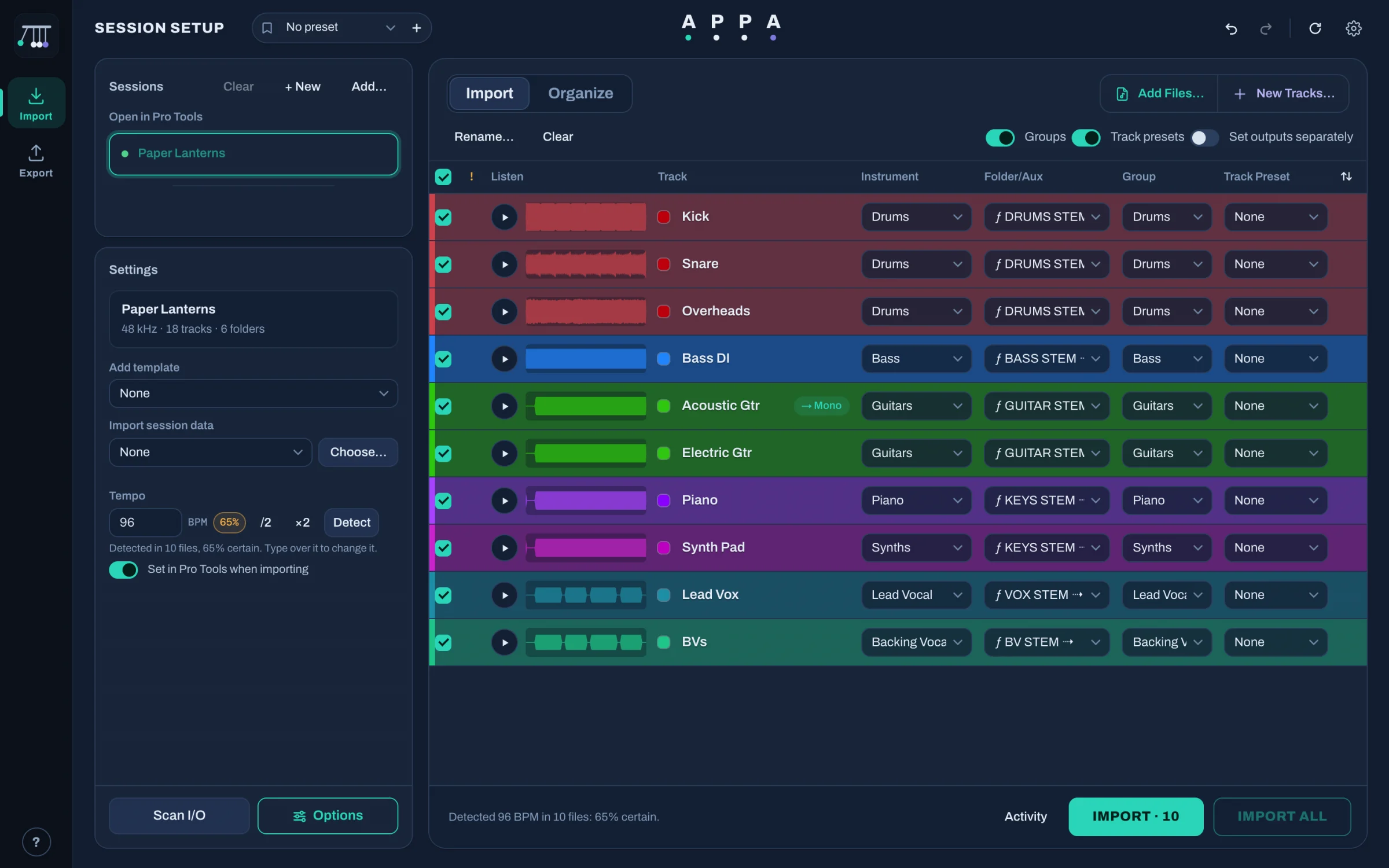
- Queue sessions: line up a whole album and build it in one go
- Colour by instrument
- Instrument worked out for you
- Folder in your template, routed to its bus
- New tracks and folders made right here in APPA
- Tempo detected and set in your session
- Listen to any file before it goes in
- Fake stereo made mono, one-sided files panned
- Groups by instrument
- Track presets recalled
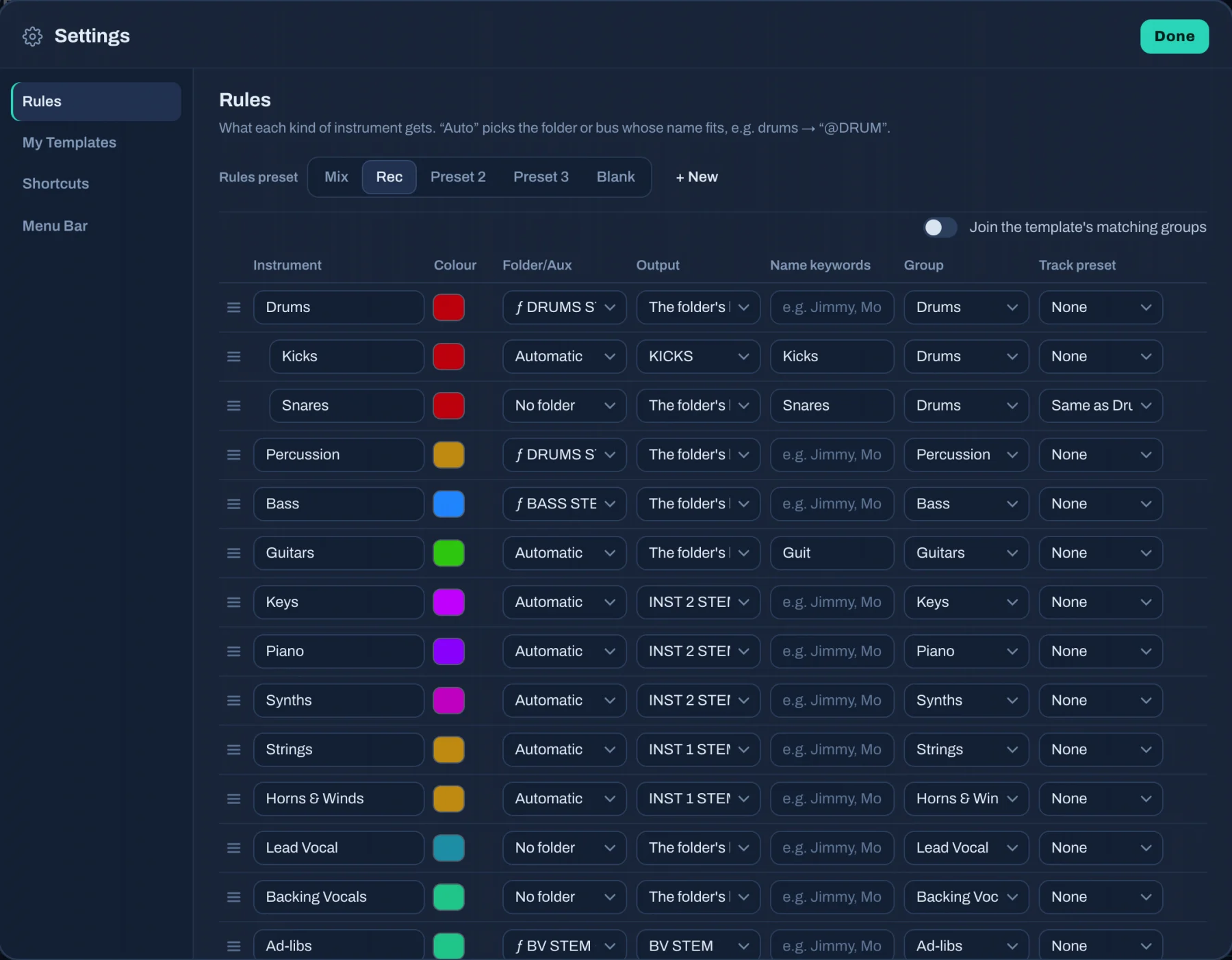
Your rules, your template
Every instrument's folder, output, colour, group, track preset and name keywords are yours to set in Settings › Rules, so APPA builds sessions the way your template is laid out. Keep presets for mixing and recording, and add your own instruments.
It listens to the files and sets the BPM in Pro Tools or Logic, and the meter too.
Queue every song's folder, press Import All, and come back to every session built.
Start, end and song-section markers, and a group per instrument, made for you.
Nothing needs to be open first: pick your template and APPA creates the new Pro Tools session or Logic project, then builds it.
Stereo files that are really mono come in as mono tracks, and ones with sound on only one side are panned hard to that side.
"Audio 1_03.wav" or "Track 7"? If the name doesn't say, APPA listens to the file and works out the instrument from how it sounds.
And when you press Import, it also
- Strips silence with your own threshold and pads
- Routes every track through its folder to the right bus
- Adds new tracks and folders from inside APPA, named and placed for you
- Sets track heights so the whole session fits on screen
- Converts MP3 and M4A cleanly, and imports MIDI too
- Organizes tracks already in a session the same way
Batch Bouncer bounces every delivery
List the mixes, stems and alt versions once. APPA solos, mutes and bounces them all, unattended, opening and closing sessions as it goes. Here are nine, in real time.
A real-time video of APPA in Logic Pro is coming soon.
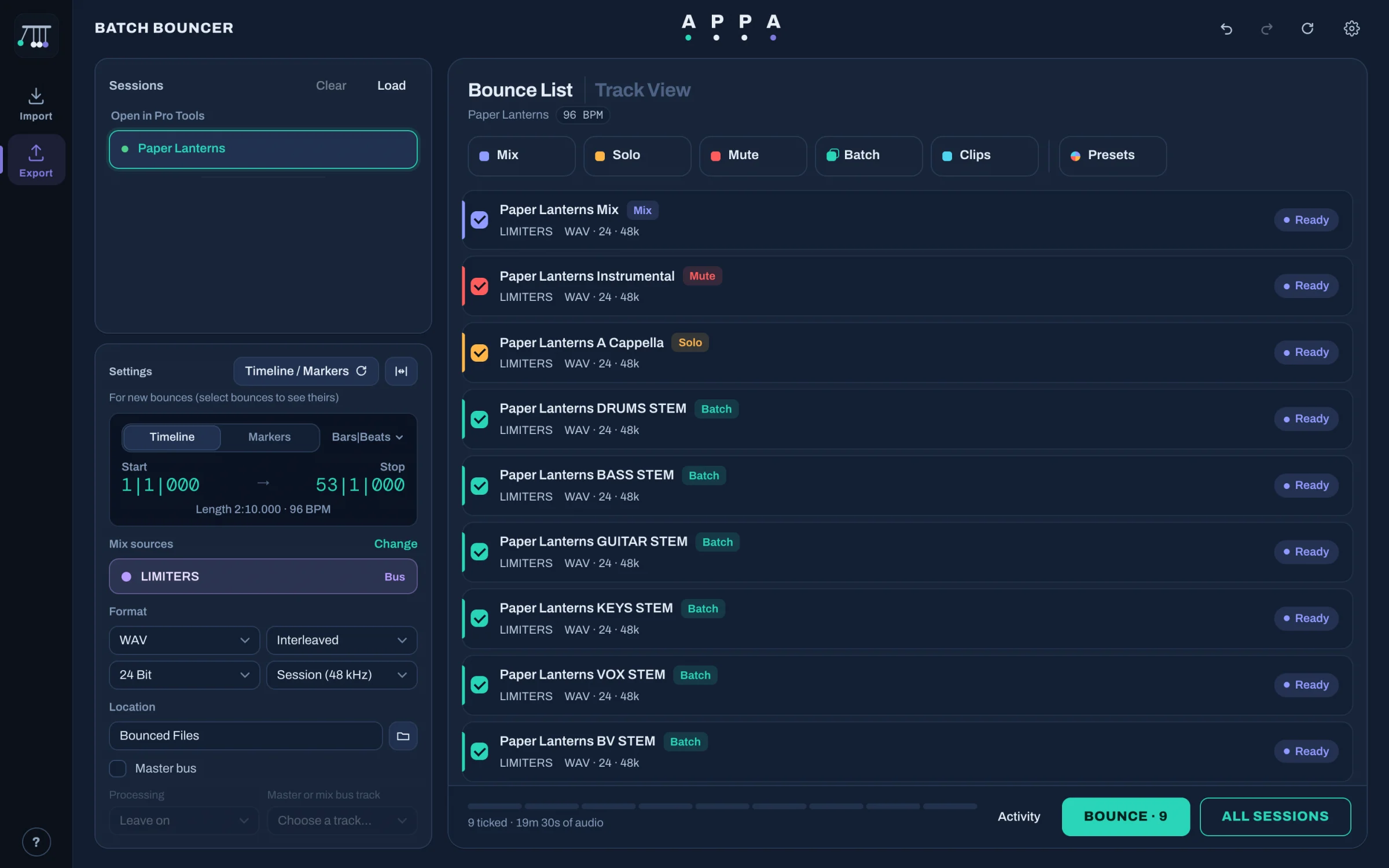
- Sessions: open or closed, as many as you like
- Bounce types: Mix, Solo, Mute, Batch, Clips
- Presets for whole delivery lists
- Status of every bounce
- Timeline or markers for the range
- Any bus or output as the source
- Master bus processing off for stems
- One click bounces the lot
Tracks feed only their sends, so you get the wet reverb and delay returns on their own.
Bypass plug-ins and mute sends per bounce for dry stems, then put back exactly as they were.
Turn off the master bus's dynamics, or everything, for stems.
Presets put the same delivery list on every song, even closed sessions, and it bounces the lot.
Mix, solo, mute, a stem per track, folder or VCA, and every clip as its own file.
Pause, stop and resume, with a log of exactly what happened.
It can also
- Alternative versions: instrumental, a cappella, TV mix, any tracks left out
- WAV, AIFF, MP3 or M4A, interleaved, multi-mono or mono, any bit depth and rate
- Bounce between markers or the timeline selection
- Import the bounces back into the session when they're done
- Name every file with your own prefix and suffix
Launch prices end in
£9 £4 a month for your first year or £300 £150 for good
The launch prices last for the first month APPA is on sale.
Claim the launch priceQuick jobs on the selected tracks, on your own keys.
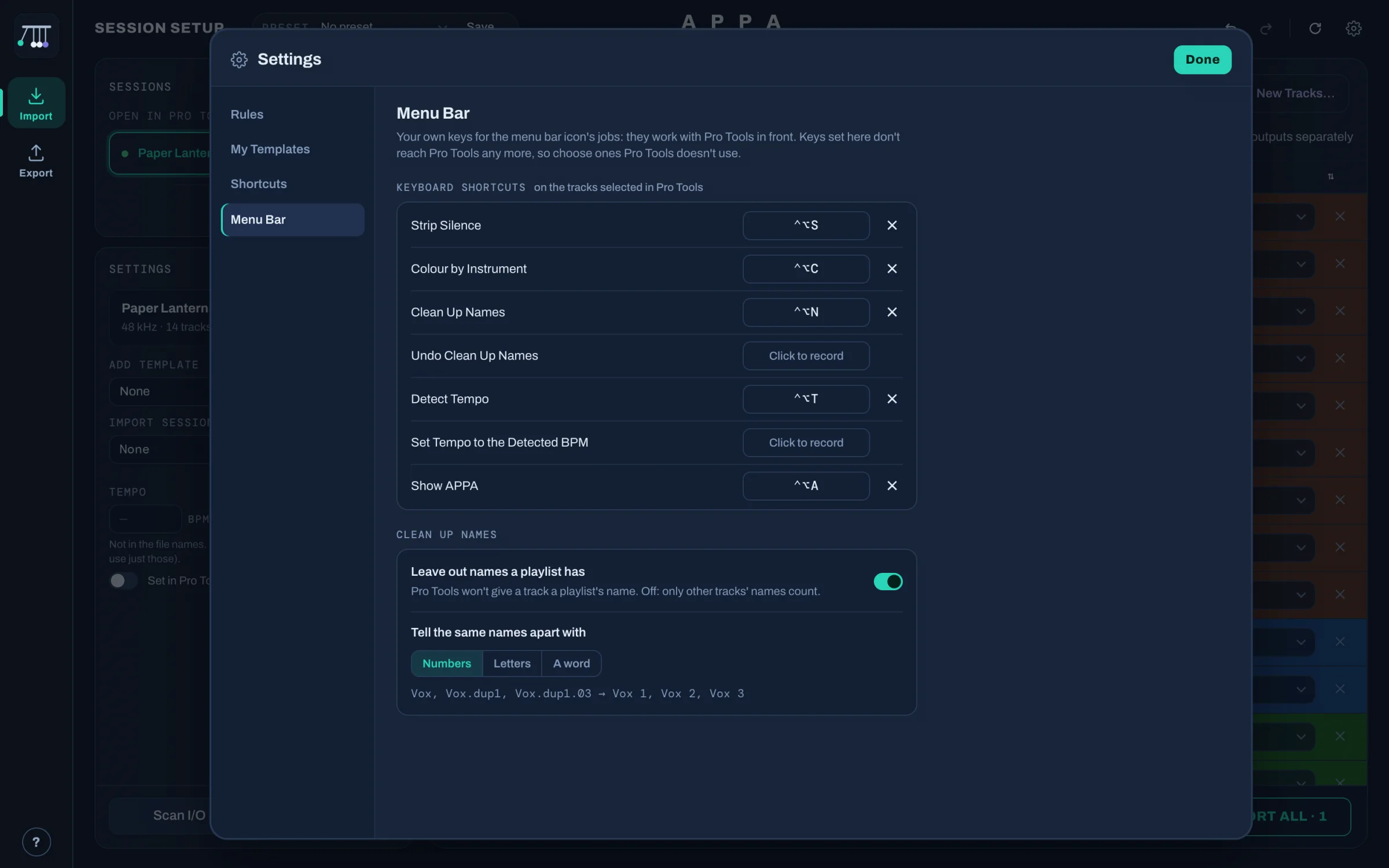
APPA's icon sits in the menu bar while you work in Pro Tools or Logic. Select some tracks and press a key: it does the job and tells you how it went.
Strip Silence on 16 tracks in about a second, without opening the window or touching a slider.
Organize a session you already have
Open any session, even one someone else made. APPA reads every track, works out what each one is, and lines up the changes: colours, folders, groups, clean names and stripped silence. Nothing happens until you press Apply.
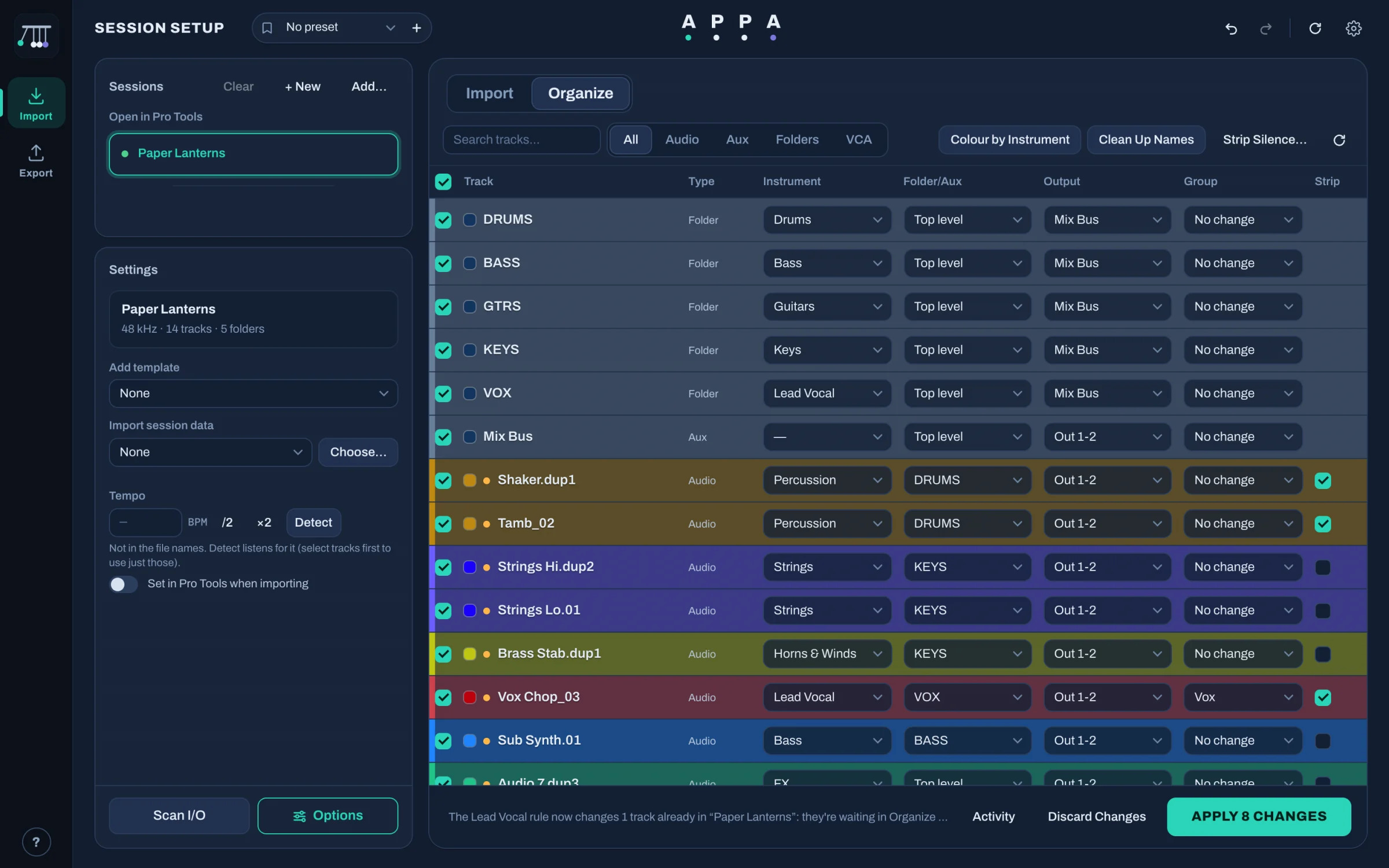
- Colour by instrument across the whole session in one click
- Clean up names: “.dup1”, “.01”, “_02” gone, matching names renumbered
- Move tracks into folders and route them to the right bus
- Make groups by instrument
- Strip silence on just the tracks you tick
- See every change first: nothing happens until you press Apply
- Undo renames that Pro Tools' own Undo can't put back
- Uses your rules from Settings, the same as Import
What's your hour worth?
That's about 16 hours a month back, for £4 a month.
£9 £4 a month for your first year or £300 £150 for good
For everyone who signs up in the first month APPA is on sale. 7 days free first.
Claim the launch priceIt works with your template, and stays out of your way.
Your folders. Your buses. Your colours.
Point APPA at the template you already use. It reads its folders, buses, groups and track presets, and puts each new track where you'd have put it. Rules per instrument (folder, output, group, colour, preset) are yours to change, and new instruments are yours to add.
Works through your DAW's own controls
In Pro Tools, APPA never touches your mouse: it talks through PTSL, Avid's own scripting interface, and Pro Tools' own menus. Logic has no scripting interface, so APPA works through its menus and windows, and uses a quick click only where Logic leaves no other way (track colours, output menus).
Nothing leaves your Mac
Your stems, sessions and bounces stay on your Mac. Instrument detection runs locally. The only thing APPA sends is a license check. If you need help, you choose what to send us.
See it before it happens
APPA shows the whole plan before it touches a session. Imports and name clean-ups can be undone in APPA, even the renames Pro Tools' own Undo can't put back.
Try everything for a week. Then pick a plan.
Both plans include everything: Import, Organize, Export and the menu bar, with updates.
Monthly
For trying it on real work, or keeping costs flat.
Cancel any time.
- Everything in APPA
- Updates while you subscribe
- Cancel any time
Perpetual license
Pay once. It never runs out.
Updates included, for good.
- Everything in APPA
- Updates included, for good
- No subscription, no renewal
Every download starts with 7 days free, everything working. Prices in GBP; VAT is worked out at checkout.
Questions engineers ask
Which versions of Pro Tools and Logic Pro does it work with?
Pro Tools 2025.10 or later for everything; some parts work with earlier versions too. APPA talks to Pro Tools through PTSL, the scripting interface Avid builds into Pro Tools.
Logic Pro 11. You choose which DAW APPA works with, and can switch any time. The free week is the easiest way to check it with your setup.
Why does it ask for Accessibility permission?
In Pro Tools, a few things can't be done through PTSL yet: reading your I/O names, making groups, recalling track presets, setting the tempo and Strip Silence. For those, APPA uses Pro Tools' own menus and windows through macOS Accessibility, the same system that VoiceOver uses, and never moves your mouse.
Logic Pro has no scripting interface at all, so APPA works Logic through Accessibility for everything. A couple of jobs Logic only allows with a real click (track colours, output menus): APPA makes that click and puts the pointer back.
You turn it on once in System Settings › Privacy & Security › Accessibility, and APPA shows you where.
Does it run on Apple Silicon and Intel Macs?
Yes. One download runs natively on both.
Will it mess up my template or my sessions?
APPA shows what it's going to do before it does it, and works with the folders and buses already in your template. Imports and name clean-ups can be undone in APPA. Like any tool that changes sessions, try it on a copy first; that's what the free week is for.
Can it bounce sessions that aren't open?
Yes. Add sessions to Export's list and APPA opens each in turn, bounces its list and closes it again. Presets put a whole set of bounces onto any session, even a closed one.
How does the launch offer work?
For the first month APPA is on sale, the monthly plan is £4 a month for your first 12 months, then £9 a month, and the perpetual license is £150 instead of £300. It's about when you sign up, not your first month: subscribe in the launch month and you keep £4 for a year.
What happens after the free week?
APPA asks for a license. Subscribe or buy, paste the key from your email, and carry on where you left off: your rules, templates, presets and shortcuts stay.
What if it doesn't work for me? Can I get a refund?
Try it for the full week first. If something's wrong after you buy, email us within 14 days for a full refund. See the refund policy.
Is APPA made by Avid or Apple?
No. APPA is an independent app for Pro Tools and Logic Pro. Pro Tools is a trademark of Avid Technology, Inc.; Logic Pro is a trademark of Apple Inc.
Safe to put on your studio Mac
APPA works on your sessions, so it's built to leave everything else alone.
- From a registered Apple developer. APPA is signed with our Apple Developer ID and notarised by Apple, which checks it for malicious software, so macOS opens it without warnings.
- Never deletes your files. Your audio is only ever read. Pro Tools and Logic import their own copies, and anything APPA makes (mono copies, conversions) is a new file. Undo Import removes only the tracks it just made.
- No malware, no adware, no tracking. It installs nothing else, shows no ads and doesn't watch what you do.
- Nothing leaves your Mac. Your stems, sessions and bounces stay on it. The only thing APPA sends is a license check.
- Asks before it acts. You see every change before it happens. It never answers Pro Tools' Missing Files window or saves over your work without saying so first.
- Secure payments. Checkout, VAT and invoices are handled by our payment provider; we never see your card.
Start your free week.
Download APPA, open a session, drop in some stems. Everything works for seven days, no strings.
macOS · Apple Silicon & Intel · Pro Tools 2025.10 or later · Logic Pro 11